The main techniques for selecting records in the database are as follows: The select statement A query The techniques are essentially the same. They both deliver a set of records from the database in a table variable that can be accessed. Use the select statement when: The selection criteria are complex. You are selecting a set of records from X++. The user is not going to change the selection criteria. Use a query when: The user can choose which records are selected. The user can change the range of records to be selected. The selection criteria are not more complex than the query can accommodate. When you use queries, develop them in the Application Object Tree (AOT) or build them from scratch in your code. In both situations, the query can be modified in the code. A query built from scratch in code can be saved so that it occurs in the AOT. However, this should usually be avoided. Build a query in the AOT when: A specific query definition is being used in many places. (The que...
Posts

D365FO: Creating Data Entities Data Entity is a new concept which has been introduced in D365FO and has major use in Data Import/Export and for Data Integration. Create a Project Solution Explorer > Right click the Project > Click Add > New Item Select ‘Data Entity’ > Place the name for the entity > Click Add Data Entity Wizard would pop-out Select the Entity Category and then select the Primary Data Source for the Entity There are 2 check boxes available in the wizard: Enable API – Check this if you would like to use this entity for Integration pupose Enable Data Management capabilities – Check this, if you would like to use this entity for Data Import/Export purpose Click Next A window will appear, where you can Add a new Data Source for the Entity and their respective fields, Remove Data Sources, remove fields, etc. After making the changes, click Finish – Entity creation is completed.
Sales Order and Purchase Order Tables and Classes SalesOrder Classes and Tables: SalesTableType and SaleslineType classes will get called while creating the SalesOrders. SalesFormLetter_Confirm SalesFormLetter_Invoice SalesFormLetter_PackingSlip SalesFormLetter_PickingLlst classes will be used to post the sales order at various document status (packing, invoice etc). Tables: SalesTable contains all SalesOrder headers regardless whether they have been posted or not. The SalesParmTable and SalesParmLine contains detailed information regarding posting sales headers and Lines. CustConfirmJour and CustConfirmTrans tables contains all Sales Confirmation headers and Lines posted in Dynamic Ax originating from Sales Orders and Lines. CustPackingSlipJour and CustPackingSlipTrans tables contains all sales PackingSlip headers and Lines posted in Dynamic Ax originating from Sales Orders and Lines. CustInvoiceJour and CustInvoiceTrans tables contains all sales all Sales Invoice headers and Lines po...
Saturday, March 9, 2019 OOPS CONCEPT IN D365 :CLASSES ,OBJECTS ,OVERRIDING ETC...MICROSOFT DYNAMICS AX 2012 x++ What is OOPS? Object Oriented Programming is a programming concept that works on the principle that objects are the most important part of your program. It allows users create the objects that they want and then create methods to handle those objects. Manipulating these objects to get results is the goal of Object Oriented Programming. Object Oriented Programming popularly known as OOP, is used in a modern programming language. Core OOPS concepts are 1) Class The class is a group of similar entities. It is only an logical component and not the physical entity. For example, if you had a class called “Expensive Cars” it could have objects like Mercedes, BMW, , etc. Its properties(data) can be price or speed of these cars. While the methods may be performed with these cars are driving, reverse, braking etc. 2) Object An object can be defined as an instance of a class, and ...
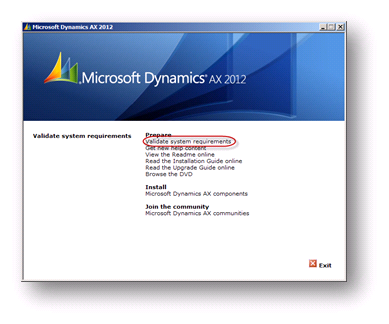
Enterprise Portal With SharePoint 2013 Installation & Configuration For Microsoft Dynamics AX 2012 R2 Before installing the enterprise portal, we have to check compatibility of the system, and install valid prerequisite before which is essential for the Dynamics Ax 2012 R2 Enterprise Portal. Let’s start inspection of system requirements. Open the Microsoft Dynamics AX 2012 R2 setup. Click on “validate system requirements” option. Check the “Enterprise Portal” checkbox from the list of components and then click on validate button. Install the Pre-requisite listed below in the result. The essential prerequisite for Enterprise Portal is SharePoint Foundation/Server. Here I am installing SharePoint 2013 Foundation. Download the following Prerequisites & install it manually: sqlncli.msi Windows6.1-KB2506143-x64.msu dotNetFx45_Full_x86_x64.exe Windows6.1-KB974405-x64.msu Synchronization.msi Microsof...